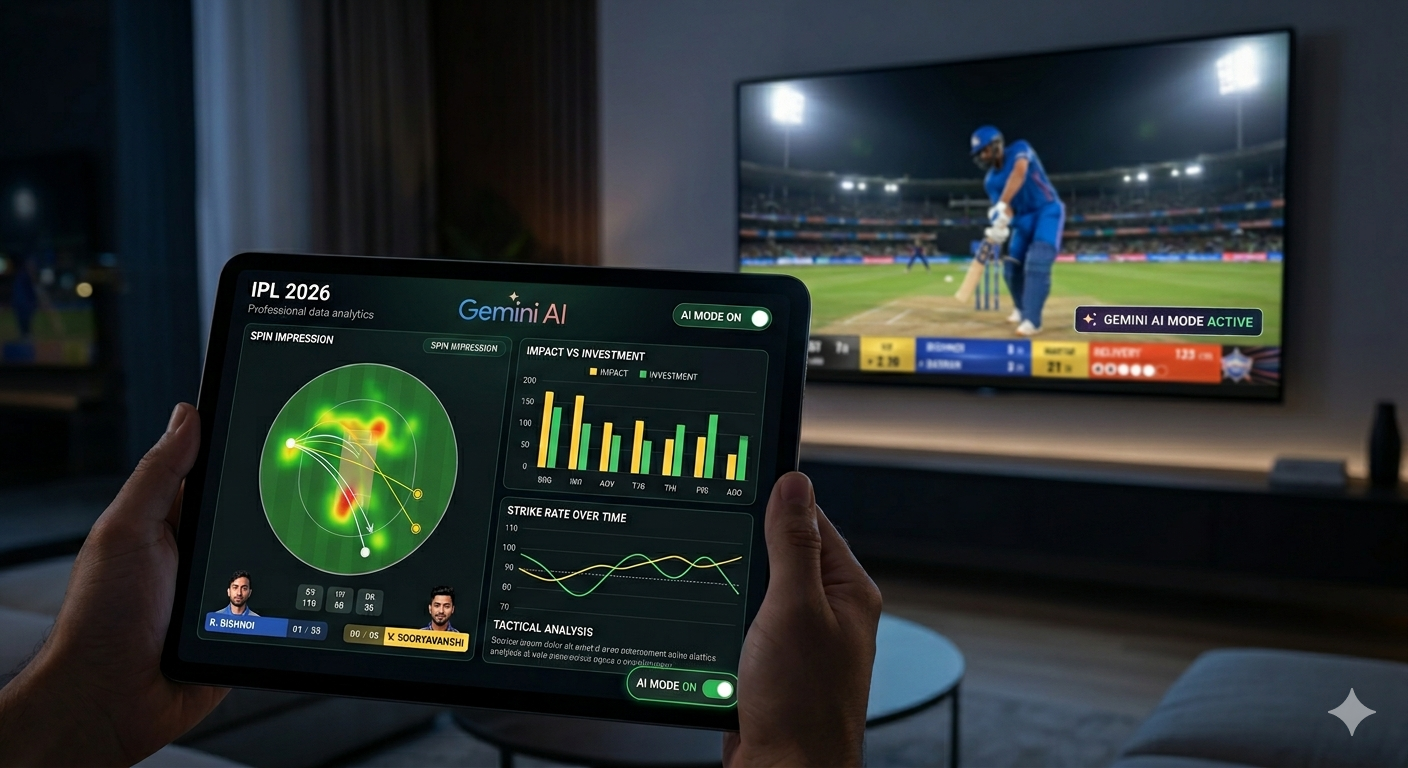
The IPL has always been more than just a cricket tournament; it’s a data scientist’s playground and a fan’s emotional rollercoaster. But as we cross the mid-way point of the 2026 season, the way we digest the game has fundamentally shifted. The partnership between the BCCI and Google to integrate AI Mode in Search hasn't just added another stat to the screen—it’s changed the "second-screen" experience from passive scrolling to active investigation. If you've been watching the matches lately, you've likely seen the AI-powered insights pop up during the live broadcast, but the real power is in your hands. Here is how to use these new tools to watch the rest of the 2026 season like a pro. 1. Tactical Analysis: Understanding the "Why" We’ve all seen the standard win-probability graphs. But Google AI Mode takes it a step further by offering conversational tactical analysis . Instead of just seeing that a team has a 30% chance of winning, you can ask specific questions like, "Why is Rashid Khan bowling now instead of at the death?" The AI processes real-time match data against historical player match-ups to explain the strategy—noting, for instance, that the current batter has a low strike rate against leg-spin in the middle overs. 2. Tracking the "Sooryavanshi Surge" Every season has a breakout star, but 2026 belongs to Vaibhav Sooryavanshi . After his blistering 78 off 26 balls against RCB just yesterday, he has officially climbed to the top of the Orange Cap leaderboard with 200 runs. AI Mode allows you to track these "momentum players" before they even hit the highlights reel. By using the "Hype Summary" feature, you can see which uncapped players are seeing a spike in search interest and performance metrics simultaneously. It’s the easiest way to stay ahead of the curve in your fantasy leagues or office chats. Also read: Ayush Badoni’s 1000-Run Milestone: The New Face of the LSG Legacy Heinrich Klaasen: The Middle-Order Monster SRH Fans Can’t Stop Searching For Cameron Green’s Return: Promise, Pressure, and a Bittersweet Comeback Sameer Rizvi Rising Fast: DC’s Impact Player Delivers Back-to-Back Player Runs Avg 50s Vaibhav Sooryavanshi 200 50.00 2 Yashasvi Jaiswal 183 91.50 2 Dhruv Jurel 176 58.67 2 3. The "Value for Money" Meter The 2026 auction broke records, with Cameron Green going to KKR for a staggering ₹25.20 crore (though capped at ₹18 crore per new rules). Naturally, every fan wants to know: Is he worth it? Google AI Mode now features an "Impact vs. Investment" overlay. You can compare the performance of high-budget signings like Green or Matheesha Pathirana against domestic sensations like Prashant Veer or Kartik Sharma (both CSK signings at ₹14.20 crore). Seeing a ₹30 lakh base-price player outperform a multi-crore international star is the kind of drama AI Mode highlights perfectly. 4. Mastering the "Impact Player" Timing The Impact Player rule is no longer a mystery if you’re using AI predictions. By analyzing the fall of wickets and the current run rate, the AI identifies the most logical time for a team to sub in their specialist. For example, if a team loses three quick wickets in the powerplay, the AI will suggest the defensive batter most likely to be subbed in to anchor the innings, complete with their recent "rescue act" stats. 5. Catch Me Up: The Non-Cliché Summary If you’ve missed a few overs, skip the dry text commentary. The "Catch Me Up" feature uses Gemini models to summarize the vibe of the match. Instead of saying "10.4: Six," it might tell you: "The momentum shifted in the 11th over when Sameer Rizvi took on the short-ball barrage, forcing the captain to change his bowling plan." It gives you the narrative context so you can jump back into the live action without feeling like you’ve missed the story. The Bottom Line As we head into Rivalry Week —with the massive MI vs. RCB clash scheduled for April 12th—the game is getting faster. Whether you're tracking Ravi Bishnoi’s hunt for the Purple Cap (currently leading with 9 wickets) or watching to see if Virat Kohli can reclaim the Orange Cap, these AI tools make the experience feel personal. The next time you’re watching, don't just look at the scorecard. Tap the AI toggle and see the game through the eyes of a pro. The IPL has always been more than just a cricket tournament; it’s a data scientist’s playground and a fan’s emotional rollercoaster. But as we cross the mid-way point of the 2026 season, the way we digest the game has fundamentally shifted. The partnership between the BCCI and Google to integrate AI Mode in Search hasn't just added another stat to the screen—it’s changed the "second-screen" experience from passive scrolling to active investigation. If you've been watching the matches lately, you've likely seen the AI-powered insights pop up during the live broadcast, but the real power is in your hands. Here is how to use these new tools to watch the rest of the 2026 season like a pro. 1. Tactical Analysis: Understanding the "Why" We’ve all seen the standard win-probability graphs. But Google AI Mode takes it a step further by offering conversational tactical analysis . Instead of just seeing that a team has a 30% chance of winning, you can ask specific questions like, "Why is Rashid Khan bowling now instead of at the death?" The AI processes real-time match data against historical player match-ups to explain the strategy—noting, for instance, that the current batter has a low strike rate against leg-spin in the middle overs. 2. Tracking the "Sooryavanshi Surge" Every season has a breakout star, but 2026 belongs to Vaibhav Sooryavanshi . After his blistering 78 off 26 balls against RCB just yesterday, he has officially climbed to the top of the Orange Cap leaderboard with 200 runs. AI Mode allows you to track these "momentum players" before they even hit the highlights reel. By using the "Hype Summary" feature, you can see which uncapped players are seeing a spike in search interest and performance metrics simultaneously. It’s the easiest way to stay ahead of the curve in your fantasy leagues or office chats. Player Runs Avg 50s Vaibhav Sooryavanshi 200 50.00 2 Yashasvi Jaiswal 183 91.50 2 Dhruv Jurel 176 58.67 2 3. The "Value for Money" Meter The 2026 auction broke records, with Cameron Green going to KKR for a staggering ₹25.20 crore (though capped at ₹18 crore per new rules). Naturally, every fan wants to know: Is he worth it? Google AI Mode now features an "Impact vs. Investment" overlay. You can compare the performance of high-budget signings like Green or Matheesha Pathirana against domestic sensations like Prashant Veer or Kartik Sharma (both CSK signings at ₹14.20 crore). Seeing a ₹30 lakh base-price player outperform a multi-crore international star is the kind of drama AI Mode highlights perfectly. 4. Mastering the "Impact Player" Timing The Impact Player rule is no longer a mystery if you’re using AI predictions. By analyzing the fall of wickets and the current run rate, the AI identifies the most logical time for a team to sub in their specialist. For example, if a team loses three quick wickets in the powerplay, the AI will suggest the defensive batter most likely to be subbed in to anchor the innings, complete with their recent "rescue act" stats. 5. Catch Me Up: The Non-Cliché Summary If you’ve missed a few overs, skip the dry text commentary. The "Catch Me Up" feature uses Gemini models to summarize the vibe of the match. Instead of saying "10.4: Six," it might tell you: "The momentum shifted in the 11th over when Sameer Rizvi took on the short-ball barrage, forcing the captain to change his bowling plan." It gives you the narrative context so you can jump back into the live action without feeling like you’ve missed the story. The Bottom Line As we head into Rivalry Week —with the massive MI vs. RCB clash scheduled for April 12th—the game is getting faster. Whether you're tracking Ravi Bishnoi’s hunt for the Purple Cap (currently leading with 9 wickets) or watching to see if Virat Kohli can reclaim the Orange Cap, these AI tools make the experience feel personal. The next time you’re watching, don't just look at the scorecard. Tap the AI toggle and see the game through the eyes of a pro. The IPL has always been more than just a cricket tournament; it’s a data scientist’s playground and a fan’s emotional rollercoaster. But as we cross the mid-way point of the 2026 season, the way we digest the game has fundamentally shifted. The partnership between the BCCI and Google to integrate AI Mode in Search hasn't just added another stat to the screen—it’s changed the "second-screen" experience from passive scrolling to active investigation. If you've been watching the matches lately, you've likely seen the AI-powered insights pop up during the live broadcast, but the real power is in your hands. Here is how to use these new tools to watch the rest of the 2026 season like a pro. 1. Tactical Analysis: Understanding the "Why" We’ve all seen the standard win-probability graphs. But Google AI Mode takes it a step further by offering conversational tactical analysis . Instead of just seeing that a team has a 30% chance of winning, you can ask specific questions like, "Why is Rashid Khan bowling now instead of at the death?" The AI processes real-time match data against historical player match-ups to explain the strategy—noting, for instance, that the current batter has a low strike rate against leg-spin in the middle overs. 2. Tracking the "Sooryavanshi Surge" Every season has a breakout star, but 2026 belongs to Vaibhav Sooryavanshi . After his blistering 78 off 26 balls against RCB just yesterday, he has officially climbed to the top of the Orange Cap leaderboard with 200 runs. AI Mode allows you to track these "momentum players" before they even hit the highlights reel. By using the "Hype Summary" feature, you can see which uncapped players are seeing a spike in search interest and performance metrics simultaneously. It’s the easiest way to stay ahead of the curve in your fantasy leagues or office chats. Player Runs Avg 50s Vaibhav Sooryavanshi 200 50.00 2 Yashasvi Jaiswal 183 91.50 2 Dhruv Jurel 176 58.67 2 3. The "Value for Money" Meter The 2026 auction broke records, with Cameron Green going to KKR for a staggering ₹25.20 crore (though capped at ₹18 crore per new rules). Naturally, every fan wants to know: Is he worth it? Google AI Mode now features an "Impact vs. Investment" overlay. You can compare the performance of high-budget signings like Green or Matheesha Pathirana against domestic sensations like Prashant Veer or Kartik Sharma (both CSK signings at ₹14.20 crore). Seeing a ₹30 lakh base-price player outperform a multi-crore international star is the kind of drama AI Mode highlights perfectly. 4. Mastering the "Impact Player" Timing The Impact Player rule is no longer a mystery if you’re using AI predictions. By analyzing the fall of wickets and the current run rate, the AI identifies the most logical time for a team to sub in their specialist. For example, if a team loses three quick wickets in the powerplay, the AI will suggest the defensive batter most likely to be subbed in to anchor the innings, complete with their recent "rescue act" stats. 5. Catch Me Up: The Non-Cliché Summary If you’ve missed a few overs, skip the dry text commentary. The "Catch Me Up" feature uses Gemini models to summarize the vibe of the match. Instead of saying "10.4: Six," it might tell you: "The momentum shifted in the 11th over when Sameer Rizvi took on the short-ball barrage, forcing the captain to change his bowling plan." It gives you the narrative context so you can jump back into the live action without feeling like you’ve missed the story. The Bottom Line As we head into Rivalry Week —with the massive MI vs. RCB clash scheduled for April 12th—the game is getting faster. Whether you're tracking Ravi Bishnoi’s hunt for the Purple Cap (currently leading with 9 wickets) or watching to see if Virat Kohli can reclaim the Orange Cap, these AI tools make the experience feel personal. The next time you’re watching, don't just look at the scorecard. Tap the AI toggle and see the game through the eyes of a pro. The IPL has always been more than just a cricket tournament; it’s a data scientist’s playground and a fan’s emotional rollercoaster. But as we cross the mid-way point of the 2026 season, the way we digest the game has fundamentally shifted. The partnership between the BCCI and Google to integrate AI Mode in Search hasn't just added another stat to the screen—it’s changed the "second-screen" experience from passive scrolling to active investigation. If you've been watching the matches lately, you've likely seen the AI-powered insights pop up during the live broadcast, but the real power is in your hands. Here is how to use these new tools to watch the rest of the 2026 season like a pro. 1. Tactical Analysis: Understanding the "Why" We’ve all seen the standard win-probability graphs. But Google AI Mode takes it a step further by offering conversational tactical analysis . Instead of just seeing that a team has a 30% chance of winning, you can ask specific questions like, "Why is Rashid Khan bowling now instead of at the death?" The AI processes real-time match data against historical player match-ups to explain the strategy—noting, for instance, that the current batter has a low strike rate against leg-spin in the middle overs. 2. Tracking the "Sooryavanshi Surge" Every season has a breakout star, but 2026 belongs to Vaibhav Sooryavanshi . After his blistering 78 off 26 balls against RCB just yesterday, he has officially climbed to the top of the Orange Cap leaderboard with 200 runs. AI Mode allows you to track these "momentum players" before they even hit the highlights reel. By using the "Hype Summary" feature, you can see which uncapped players are seeing a spike in search interest and performance metrics simultaneously. It’s the easiest way to stay ahead of the curve in your fantasy leagues or office chats. Player Runs Avg 50s Vaibhav Sooryavanshi 200 50.00 2 Yashasvi Jaiswal 183 91.50 2 Dhruv Jurel 176 58.67 2 3. The "Value for Money" Meter The 2026 auction broke records, with Cameron Green going to KKR for a staggering ₹25.20 crore (though capped at ₹18 crore per new rules). Naturally, every fan wants to know: Is he worth it? Google AI Mode now features an "Impact vs. Investment" overlay. You can compare the performance of high-budget signings like Green or Matheesha Pathirana against domestic sensations like Prashant Veer or Kartik Sharma (both CSK signings at ₹14.20 crore). Seeing a ₹30 lakh base-price player outperform a multi-crore international star is the kind of drama AI Mode highlights perfectly. 4. Mastering the "Impact Player" Timing The Impact Player rule is no longer a mystery if you’re using AI predictions. By analyzing the fall of wickets and the current run rate, the AI identifies the most logical time for a team to sub in their specialist. For example, if a team loses three quick wickets in the powerplay, the AI will suggest the defensive batter most likely to be subbed in to anchor the innings, complete with their recent "rescue act" stats. 5. Catch Me Up: The Non-Cliché Summary If you’ve missed a few overs, skip the dry text commentary. The "Catch Me Up" feature uses Gemini models to summarize the vibe of the match. Instead of saying "10.4: Six," it might tell you: "The momentum shifted in the 11th over when Sameer Rizvi took on the short-ball barrage, forcing the captain to change his bowling plan." It gives you the narrative context so you can jump back into the live action without feeling like you’ve missed the story. The Bottom Line As we head into Rivalry Week —with the massive MI vs. RCB clash scheduled for April 12th—the game is getting faster. Whether you're tracking Ravi Bishnoi’s hunt for the Purple Cap (currently leading with 9 wickets) or watching to see if Virat Kohli can reclaim the Orange Cap, these AI tools make the experience feel personal. The next time you’re watching, don't just look at the scorecard. Tap the AI toggle and see the game through the eyes of a pro.